

Introduction
Creating admin dashboards in Laravel can be time consuming. Laravel Filament simplifies this by providing a lightweight, flexible, and open source admin panel that’s beginner friendly yet powerful for advanced applications.
In this guide, we’ll explore:
-
- Installing and configuring Laravel Filament
-
- Accessing the default Admin panel
-
- Creating admin users and resources (e.g., Customer module)
-
- Implementing custom actions
-
- Setting up multi panel dashboards (e.g., Admin and Employee panels)
-
- Understanding its open source benefits and ecosystem
What is Laravel Filament?
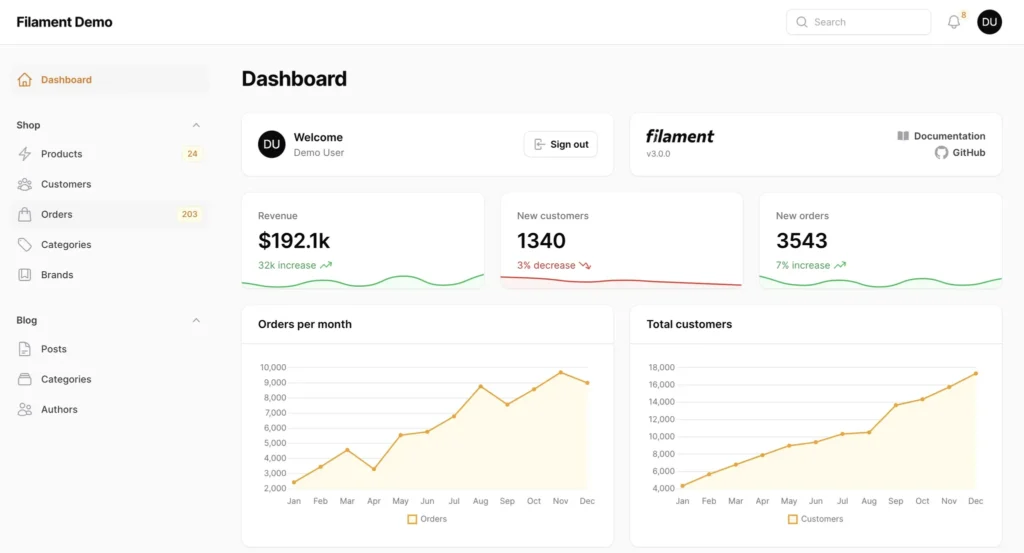
Laravel Filament is a free, open source admin panel framework for Laravel applications. It provides ready to use dashboards, CRUD generation, and multi panel support while staying lightweight and developer friendly.
License:
Filament is released under the MIT License, which means you can use it freely in personal and commercial projects, modify it, and redistribute it without restrictions.
Key features:
-
- Open source and community driven: Actively maintained on GitHub with worldwide contributions.
-
- Modern UI: Built with Tailwind CSS, responsive and accessible.
-
- Rapid CRUD generation: Auto generates forms and tables for your models.
-
- Multi panel support: Perfect for Admin, Staff, or Employee dashboards.
-
- Extensible and customizable: Add widgets, actions, and custom components easily.
-
- Multi tenancy support: Ideal for SaaS and multi client apps.
-
- Integration friendly: Works with Spatie Permissions for role based access control
Prerequisites
Before you start, ensure you have:
-
- Laravel 10+ installed
-
- PHP 8.1+ and Composer installed
-
- Basic understanding of Laravel models and migrations
Step 1: Install Laravel Filament
Open your terminal and run:
composer require filament/filament
composer require filament/filamentPublish the configuration file:
php artisan vendor:publish --tag=filament-configRun migrations:
php artisan migrateStep 2: Access the Default Admin Panel
Filament’s default panel is available at:
http://your-app-url/adminThis Admin panel comes pre configured for dashboards, user management, and resource creation. You’ll need an admin user to log in.
Step 3: Create an Admin User
Use Filament’s built in command:
php artisan make:filament-userYou’ll be prompted to enter:
-
- Name
-
- Password
After creating the user, you can log in at /admin.
Step 4: Create a Customer Resource
php artisan make:model Customer -m4.1 Create the Model & Migration
Update the migration file:
Schema::create('customers', function (Blueprint $table) {
    $table->id();
    $table->string('name');
    $table->string('email')->unique();
    $table->string('phone')->nullable();
    $table->timestamps();
});Run:
php artisan migrate4.2 Generate the Filament Resource
php artisan make:filament-resource Customer4.3 Define Form Fields
Edit CustomerResource.php:
public static function form(Form $form): Form
{
    return $form->schema([
        TextInput::make('name')->required()->maxLength(255),
        TextInput::make('email')->email()->required(),
        TextInput::make('phone')->tel()->maxLength(15),
    ]);
}4.4 Define Table Columns
public static function table(Table $table): Table
{
    return $table->columns([
        TextColumn::make('name')->sortable()->searchable(),
        TextColumn::make('email')->sortable()->searchable(),
        TextColumn::make('phone'),
    ]);
}Step 5: Add Custom Actions
You can add actions (e.g., Send Welcome Email) to tables:
public static function table(Table $table): Table
{
    return $table->columns([
        TextColumn::make('name'),
        TextColumn::make('email'),
    ])->actions([
        Action::make('sendWelcomeEmail')
            ->label('Send Welcome Email')
            ->action(fn (Customer $record) => $record->sendWelcomeEmail())
            ->requiresConfirmation()
            ->color('success'),
    ]);
}Step 6: Create an Employee Panel (Multi Panel Setup)
6.1 Generate the Panel
php artisan make:filament-panel EmployeeThis will create a new configuration for the Employee panel (e.g.,/employee route).
6.2 Customize the Panel
-
- Update brand name in config/filament.php:
'brand' => 'Employee Panel',-
- Assign authentication guard:
'auth.guard' => 'employee',6.3 Role & Permission Control (Spatie)
Install Spatie Permissions:
composer require spatie/laravel-permission
php artisan vendor:publish --provider="Spatie\Permission\PermissionServiceProvider"
php artisan migrateAssign roles to users (e.g.,
public static function canViewAny(): bool
{
    return auth()->user()->hasRole('employee');
}Step 7: Branding and Navigation
You can fully customize Filament branding and menus:
-
- Update brand name and logo in config/filament.php
-
- Add custom navigation menus for each panel
-
- Tailwind CSS support for theme customization
Example:
'brand' => 'My Company Admin',Why Choose Laravel Filament (Open Source Benefits)
-
- MIT Licensed (Open Source): Free for personal and commercial use.
-
- Community driven: Active GitHub repository with frequent updates and plugins.
-
- Modern UI: Tailwind CSS based, responsive, and accessible.
-
- Feature rich:
1. CRUD generation
2. Form & Table builders
3. Widgets & custom dashboards
4. Multi panel and multi tenant support
5. Role & permission integration (Spatie)
- Feature rich:
-
- Developer friendly: Simple commands, clean API, and excellent docs.
-
- Thriving ecosystem: Extensions for charts, notifications, file management, and more.
-
- No licensing costs: Perfect for startups and enterprise solutions alike.
Result
After completing these steps, you’ll have:
-
- A default Admin panel with login and dashboard
-
- A Customer resource with full CRUD functionality
-
- Custom actions for quick tasks
-
- A separate Employee panel with role based access
Key Learnings
-
- Filament simplifies Laravel admin development
-
- Multi panel setup supports role specific dashboards
-
- Actions enhance interactivity without extra routes
-
- Integrates well with Spatie Permission for RBAC
Conclusion & CTA
Laravel Filament is a powerful, open source tool for building modern admin dashboards quickly. Whether you need a simple CRUD panel or a multi role, multi tenant dashboard, Filament adapts to your project needs.
Need help building a Laravel Filament dashboard?
Contact us, we create scalable and elegant admin solutions for businesses of all sizes.

Hi! This is my first visit to your blog! We are a team of volunteers and starting a new initiative in a community in the same niche. Your blog provided us valuable information to work on. You have done a extraordinary job!